Add New Application
This guide outlines the steps required to add a new application to DataStori.
Onboard with the AI Agent
The fastest way to add a new application is with our AI Pipeline Builder. Just tell the agent what you need — for example, the tool you want to pull from and your business goal — and it will find the required APIs, onboard the application, and create the pipelines for you.
Once you describe your goal, the agent identifies the right endpoints, configures authentication, and proposes the pipelines. On your approval, the pipelines are created and deployed.
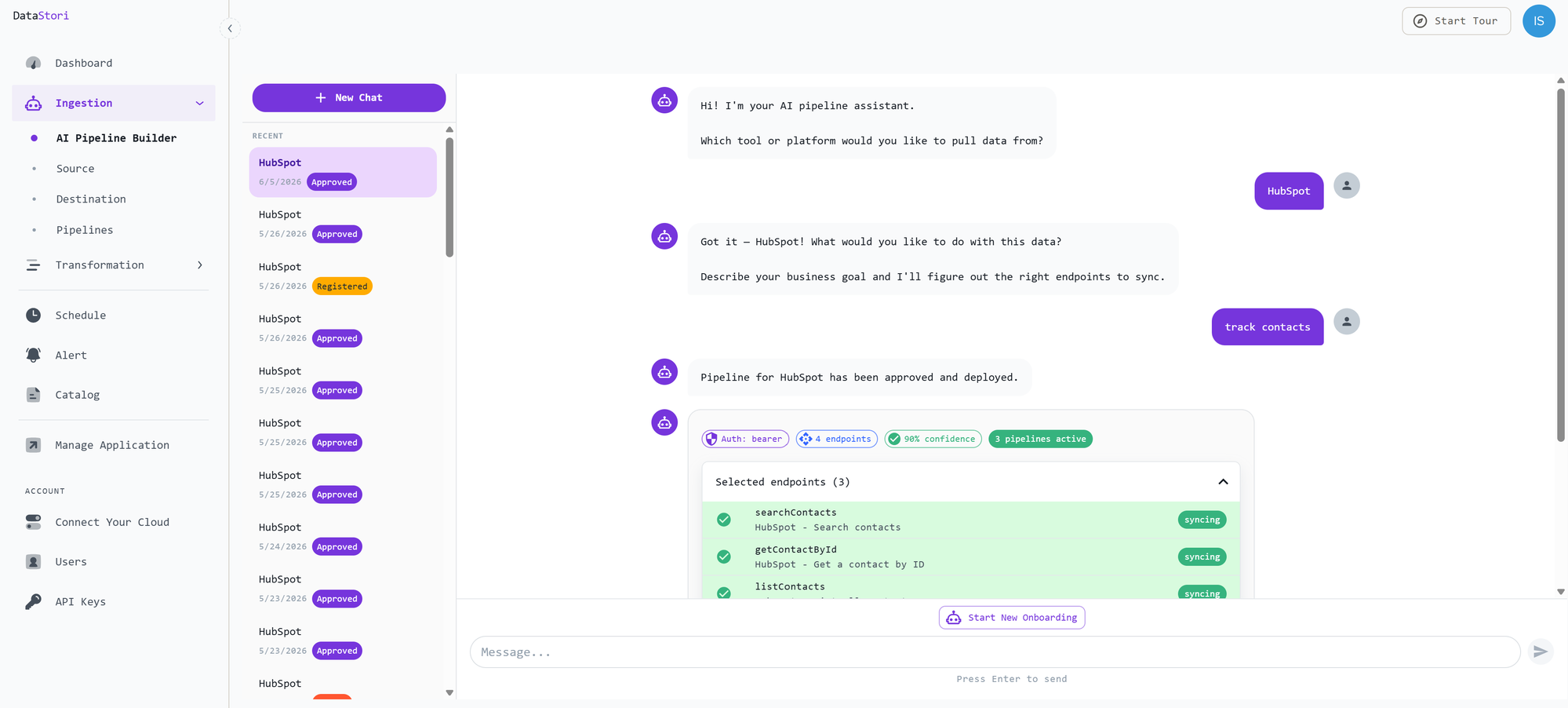
The agent does the heavy lifting and surfaces its choices — selected endpoints, authentication, and confidence — so you can review everything before approving. You can also make manual adjustments using the steps below, but most of the work is handled by the agent and simply reviewed by you.
Core Concepts: Structure of Onboarded Apps
Every application added to DataStori consists of two main components: Application and Modules. Together, these define the data pipeline.
| Component | Function | Example (SAP S4/HANA) |
|---|---|---|
| Application | Defines the "Parent" connection. It handles API authentication, the host URL, and global headers. | SAP S4/HANA (Defines OAuth2 & Tenant URL) |
| Module | Defines a collection of related APIs (via OpenAPI 3.0 spec) and pagination logic. | Product Master (Get all Products) Sales Orders (Get Order History) |
Note: A single Application can contain multiple Modules. The combination of an Application + A Module (e.g., SAP S4/HANA + Product Master) creates a functional data pipeline.
1. Application Component
The Application component acts as the gateway. It stores the credentials and custom properties required to establish a connection with the API.
To view or manage apps, navigate to the Add New Application section.
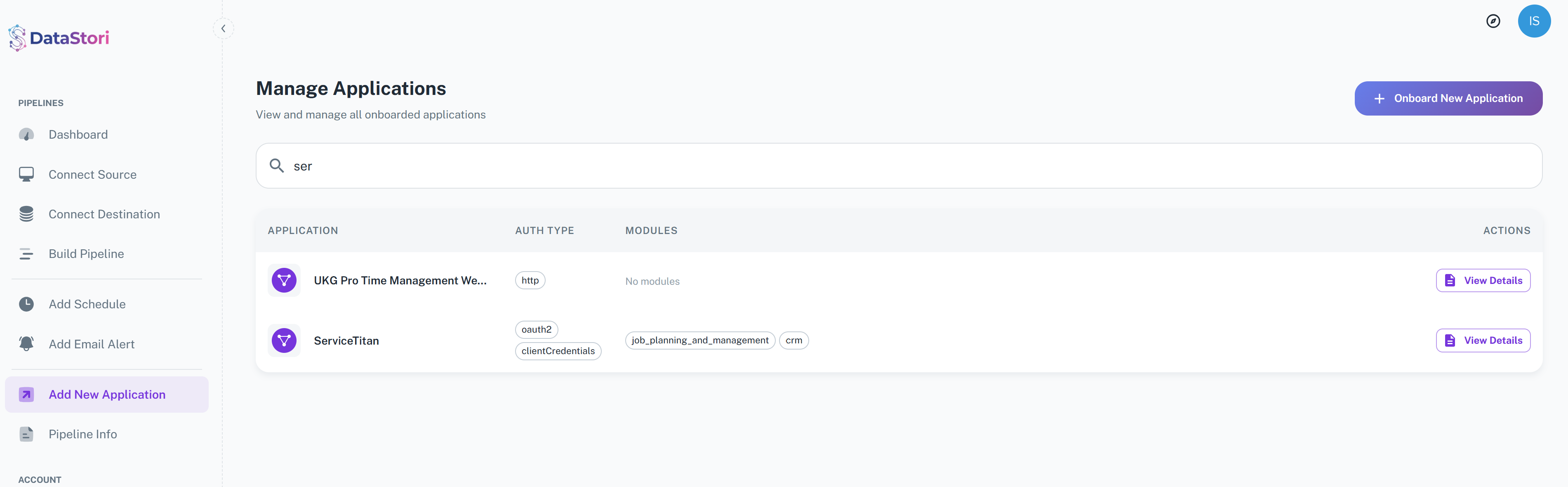
Click View Details on any app to inspect its properties and associated modules.

Configuration Properties
When adding an application, you must define the following:
A. Identity
- API_ID: A unique identifier for the application within DataStori.
B. Authentication
You must select an Authentication Scheme and a corresponding Authentication Type.
- Scheme: HTTP
- Basic
- Bearer Token
- Scheme: API Key
- API Key (Header/Query)
- Scheme: OAuth 2.0
- Client Credentials
- Password
- Authorization Code
- Static Refresh Token (e.g., Zoho)
Client Authentication (for OAuth 2.0) If using OAuth 2.0 or Client Credentials, select the transmission method:
- Client secret basic
- Client secret post
- Private Key JWT
- Client Secret JWT
C. Custom Global Properties
In addition to authentication, many APIs require specific parameters to be sent with every request (e.g., a Tenant ID or specific header). You can define these as global properties.
Supported Property Types:
- Domain: The API Host URL.
- Headers: Custom headers injected into every request.
- Query Params: appended to the URL.
- Path Params: substituted in the URL path.
- Body Params: injected into the request body.
2. Module Component
A Module is a container for specific API definitions using the OpenAPI 3.0 specification.
- Purpose: It defines exactly what data can be pulled (e.g., "Get Users", "Get Inventory").
- Examples:
- SAP: Product Master, Sales Orders.
- Service Titan: CRM, Inventory, Scheduling.
- Capabilities: Users can download existing API specs, view pagination details, or update modules to add new APIs.
To view module details, navigate to the Application Details page and select a module from the list.
Pagination Properties
Proper pagination is essential for data ingestion.
- Please refer to the Pagination Guide under the Advanced section to learn how to define these properties.
- Customization: You can modify the spec to define API-specific pagination or enable/disable pagination per pipeline.
3. Technical Requirements: OpenAPI 3.0 Spec
To successfully onboard a module, the uploaded API definition must be OpenAPI 3.0 compliant. Please adhere to the following strict guidelines to ensure code generation works correctly:
Validation Checklist
- Unique OperationID: Every API endpoint must have a unique
operationId. This serves as the identifier for the application logic. Do not use special characters in the ID. - Read-Only Focus: Remove mutation endpoints (
POST,PATCH,DELETE) from the spec unless absolutely necessary. Keep the spec lean by retaining only data-retrieval endpoints (GET). - Reserved Characters: If your API requires special characters in parameters, use the flag
allowReserved: truein the spec. - Hierarchy: Values defined in the Application Component (Global Properties) will override default values specified in the OpenAPI spec.
4. Verification
Once the application is successfully onboarded:
- Navigate to the Sources section of the platform.
- Verify that your new application appears in the catalog.
- You can now use this application to build pipelines and extend your data catalog.