Problem statement
In continuation of the data integration article, we will be exploring different mediums of fetching the data from the application.
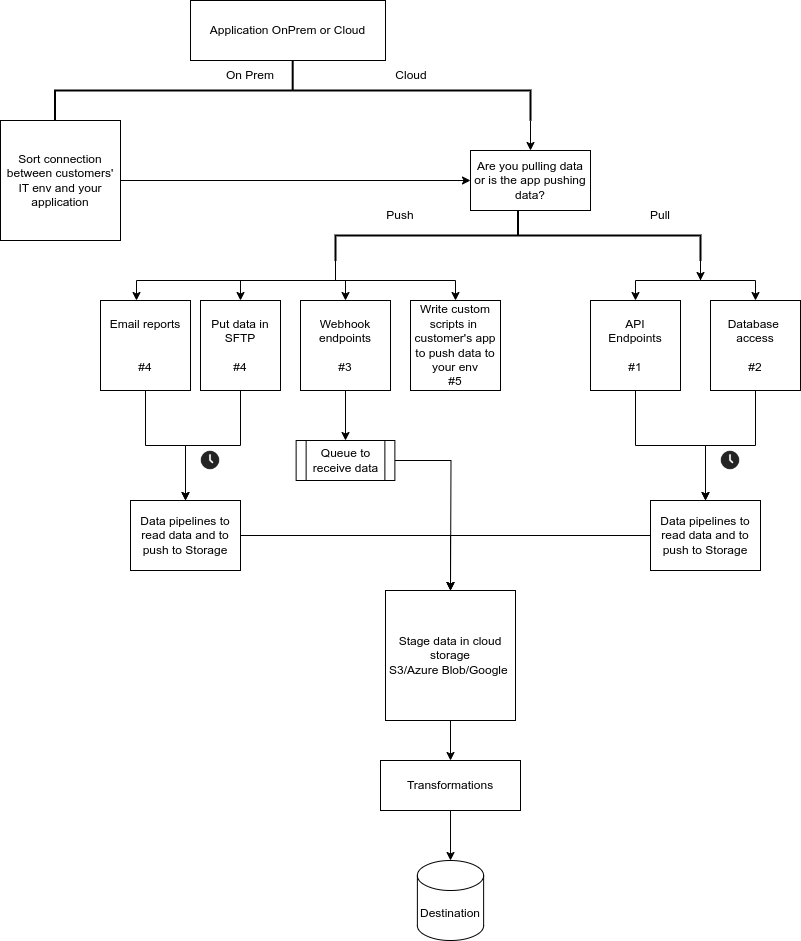
Data Fetch options
Depending upon the application, it will share data with you in one of the following ways:
- API
- Database
- Webhook
- Email reports
- Data in SFTP/One Drive/Google Drive/S3
- Custom scripts in customers' app environment
Above sequence is our preference of working with a data fetch medium and the pros and cons for each of the mediums is described below.
Pros and Cons
| Data Fetch Method | Pros | Cons |
|---|---|---|
| API | - Standardized format. - High level of automation. - Decoupled from the underlying application changes. - Users can control when, what and how much data to fetch. | - Dependency on external service availability. - More technical and less business user friendly. - Requires API integration and maintenance. |
| Database | - Direct access to raw data. - High performance for complex queries. - Can be highly secure if properly managed. - Users can control when, what and how much data to fetch. | - Tightly coupled with the underlying application changes. - Potential security risks if not properly secured. |
| Webhook | - Real-time data delivery. - Can be configured for specific events/data. | - Requires endpoint setup and maintenance. - Limited by the capabilities of the webhook provider. - Handling high volumes of data can be challenging. - No way of fetching historical records. - The data is pushed and user cannot control when to fetch data. |
| Email Reports | - Simple to set up and use. - Familiar format for most users. - No special infrastructure required. | - Data is not real-time. - Limited automation potential. - Handling and processing email data is cumbersome. - Challenges with historical load or backload of the data |
| Data in SFTP/OneDrive/Google Drive/S3 | - Easy to set up file sharing and storage. - Accessible from multiple locations. - Providers offer robust security features. | - Not suitable for real-time data needs. - Manual process to update and maintain files. - Data format can vary, requiring additional processing. |
| Custom Scripts in Customer's App Environment | - Highly customizable to specific needs. - Direct integration with the app environment. - Can be optimized for performance. | - Requires development and maintenance resources. - Potential security risks if not properly managed. - Dependent on the customer's infrastructure. |